Quickly Open an Existing Session:
- Press and hold down the CTRL + the letter O key.

NOTE: The method I describe below will NOT work with some older versions of Pro Tools.
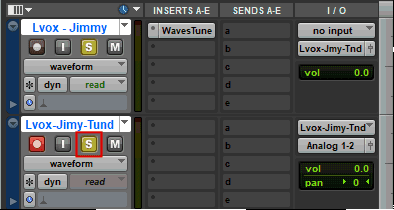
Use this method to record (print) the effects or processing plug-ins used on one track to a NEW track. The effects or processing will be incorporated into the new track, and you can then make the original track with the effects or processing plug-ins on it inactive. This will reduce the computer resources (RAM and CPU) consumed to run the plug-ins in real time on the original track.
For this tutorial I used Waves Tune to correct a few pitch problems on a vocal track. I then recorded the pitch corrected track to a new track.


For this tutorial I'm recording a mono vocal track. The new track I record to needs to be mono. If you record a stereo track, for example a stereo keyboard track you will probably want to record to a stereo track.